How to Manage Services in App Platform

Validated on 24 Feb 2024 • Last edited on 6 Feb 2026

App Platform is a fully managed Platform-as-a-Service (PaaS) that deploys applications from Git repositories or container images. It automatically builds, deploys, and scales components while handling all underlying infrastructure.

The usual app creation process creates a service by default. Use the steps below only if you’re adding a new resource that needs an internet-accessible endpoint. If the resource only needs internal access, create an internal service instead. If it doesn’t need network access, create a worker.

Add a Service to an App Using Automation

You can add a service to an app using the CLI’s app update command or the API’s app update endpoint. To add a service, update the app spec with the service’s specifications and submit the spec using the following command or endpoint.

How to Add a Service to an App Using the DigitalOcean CLI
  1. Install doctl, the official DigitalOcean CLI.
  2. Create a personal access token and save it for use with doctl.
  3. Use the token to grant doctl access to your DigitalOcean account.
    doctl auth init
  4. Finally, run doctl apps update. Basic usage looks like this, but you can read the usage docs for more details:
    doctl apps update <app id> [flags]
    The following example updates an app with the ID f81d4fae-7dec-11d0-a765-00a0c91e6bf6 using an app spec located in a directory called /src/your-app.yaml. Additionally, the command returns the updated app’s ID, ingress information, and creation date:
    doctl apps update f81d4fae-7dec-11d0-a765-00a0c91e6bf6 --spec src/your-app.yaml --format ID,DefaultIngress,Created
How to Add a Service to an App Using the DigitalOcean API
  1. Create a personal access token and save it for use with the API.
  2. Send a PUT request to https://api.digitalocean.com/v2/apps/{id}.

cURL

Using cURL:

curl -X PUT \
-H "Content-Type: application/json" \
-H "Authorization: Bearer $DIGITALOCEAN_TOKEN" \
"https://api.digitalocean.com/v2/apps/{id}" \
-d '{"alerts":[{"rule":"DEPLOYMENT_FAILED"},{"rule":"DOMAIN_FAILED"}],"domains":[{"domain":"example.com","type":"PRIMARY","zone":"example.com"}],"envs":[{"key":"API_KEY","scope":"RUN_AND_BUILD_TIME","type":"SECRET","value":"EV[1:zqiRIeaaYK/NqctZDYzy6t0pTrtRDez8:wqGpZRrsKN5nPhWQrS479cfBiXT0WQ==]"}],"features":["buildpack-stack=ubuntu-22"],"ingress":{},"name":"example-app","region":"nyc","services":[{"autoscaling":{"max_instance_count":4,"metrics":{"cpu":{"percent":70}},"min_instance_count":2},"git":{"branch":"main","repo_clone_url":"https://github.com/digitalocean/sample-nodejs.git"},"internal_ports":[8080],"log_destinations":[{"name":"your_log_consumer_name","open_search":{"endpoint":"logs.example.com:12345","basic_auth":{"user":"doadmin","password":"1234567890abcdef"},"index_name":"example-index","cluster_name":"example-cluster"}}],"name":"sample-nodejs","run_command":"yarn start","source_dir":"/"}]}'

Python

Using PyDo, the official DigitalOcean API client for Python:

import os
from pydo import Client

client = Client(token=os.environ.get("DIGITALOCEAN_TOKEN"))
req = {
"spec": {
    "name": "web-app-01",
    "region": "nyc",
    "domains": [
        {
            "domain": "app.example.com",
            "type": "DEFAULT",
            "wildcard": True,
            "zone": "example.com",
            "minimum_tls_version": "1.3",
        }
    ],
    "services": [],
    "static_sites": [
        {
            "cors": {
                "allow_origins": [
                    {"exact": "https://www.example.com"},
                    {"regex": "^.*example.com"},
                ],
                "allow_methods": [
                    "GET",
                    "OPTIONS",
                    "POST",
                    "PUT",
                    "PATCH",
                    "DELETE",
                ],
                "allow_headers": ["Content-Type", "X-Custom-Header"],
                "expose_headers": ["Content-Encoding", "X-Custom-Header"],
                "max_age": "5h30m",
                "allow_credentials": False,
            },
            "routes": [{"path": "/api", "preserve_path_prefix": True}],
        }
    ],
    "jobs": [
        {
            "name": "api",
            "gitlab": {
                "branch": "main",
                "deploy_on_push": True,
                "repo": "digitalocean/sample-golang",
            },
            "image": {
                "registry": "registry.hub.docker.com",
                "registry_type": "DOCR",
                "repository": "origin/master",
                "tag": "latest",
            },
            "dockerfile_path": "path/to/Dockerfile",
            "build_command": "npm run build",
            "run_command": "bin/api",
            "source_dir": "path/to/dir",
            "envs": [
                {
                    "key": "BASE_URL",
                    "scope": "BUILD_TIME",
                    "type": "GENERAL",
                    "value": "http://example.com",
                }
            ],
            "environment_slug": "node-js",
            "log_destinations": {
                "name": "my_log_destination",
                "papertrail": {
                    "endpoint": "https://mypapertrailendpoint.com"
                },
                "datadog": {
                    "endpoint": "https://mydatadogendpoint.com",
                    "api_key": "abcdefghijklmnopqrstuvwxyz0123456789",
                },
                "logtail": {
                    "token": "abcdefghijklmnopqrstuvwxyz0123456789"
                },
               "open_search": {
                    "endpoint": "https://myopensearchendpoint.com:9300"
                    "index_name": "logs"
                    "basic_auth": {
                        "user": "doadmin",
                        "password": "password"
                    }
                },
            },
            "instance_count": 2,
            "instance_size_slug": "apps-s-1vcpu-0.5gb",
            "kind": "PRE_DEPLOY",
        }
    ],
    "workers": [
        {
            "name": "api",
            "gitlab": {
                "branch": "main",
                "deploy_on_push": True,
                "repo": "digitalocean/sample-golang",
            },
            "image": {
                "registry": "registry.hub.docker.com",
                "registry_type": "DOCR",
                "repository": "origin/master",
                "tag": "latest",
            },
            "dockerfile_path": "path/to/Dockerfile",
            "build_command": "npm run build",
            "run_command": "bin/api",
            "source_dir": "path/to/dir",
            "envs": [
                {
                    "key": "BASE_URL",
                    "scope": "BUILD_TIME",
                    "type": "GENERAL",
                    "value": "http://example.com",
                }
            ],
            "environment_slug": "node-js",
            "log_destinations": {
                "name": "my_log_destination",
                "papertrail": {
                    "endpoint": "https://mypapertrailendpoint.com"
                },
                "datadog": {
                    "endpoint": "https://mydatadogendpoint.com",
                    "api_key": "abcdefghijklmnopqrstuvwxyz0123456789",
                },
                "logtail": {
                    "token": "abcdefghijklmnopqrstuvwxyz0123456789"
                },
               "open_search": {
                    "endpoint": "https://myopensearchendpoint.com:9300"
                    "index_name": "logs"
                    "basic_auth": {
                        "user": "doadmin",
                        "password": "password"
                    }
                },
            },
            "instance_count": 2,
            "instance_size_slug": "apps-s-1vcpu-0.5gb",
        }
    ],
    "functions": [
        {
            "cors": {
                "allow_origins": [
                    {"exact": "https://www.example.com"},
                    {"regex": "^.*example.com"},
                ],
                "allow_methods": [
                    "GET",
                    "OPTIONS",
                    "POST",
                    "PUT",
                    "PATCH",
                    "DELETE",
                ],
                "allow_headers": ["Content-Type", "X-Custom-Header"],
                "expose_headers": ["Content-Encoding", "X-Custom-Header"],
                "max_age": "5h30m",
                "allow_credentials": False,
            },
            "routes": [{"path": "/api", "preserve_path_prefix": True}],
            "name": "api",
            "source_dir": "path/to/dir",
            "alerts": [
                {
                    "rule": "CPU_UTILIZATION",
                    "disabled": False,
                    "operator": "GREATER_THAN",
                    "value": 2.32,
                    "window": "FIVE_MINUTES",
                }
            ],
            "envs": [
                {
                    "key": "BASE_URL",
                    "scope": "BUILD_TIME",
                    "type": "GENERAL",
                    "value": "http://example.com",
                }
            ],
            "gitlab": {
                "branch": "main",
                "deploy_on_push": True,
                "repo": "digitalocean/sample-golang",
            },
            "log_destinations": {
                "name": "my_log_destination",
                "papertrail": {
                    "endpoint": "https://mypapertrailendpoint.com"
                },
                "datadog": {
                    "endpoint": "https://mydatadogendpoint.com",
                    "api_key": "abcdefghijklmnopqrstuvwxyz0123456789",
                },
                "logtail": {
                    "token": "abcdefghijklmnopqrstuvwxyz0123456789"
                },
               "open_search": {
                    "endpoint": "https://myopensearchendpoint.com:9300"
                    "index_name": "logs"
                    "basic_auth": {
                        "user": "doadmin",
                        "password": "password"
                    }
                },
            },
        }
    ],
    "databases": [
        {
            "cluster_name": "cluster_name",
            "db_name": "my_db",
            "db_user": "superuser",
            "engine": "PG",
            "name": "prod-db",
            "production": True,
            "version": "12",
        }
    ],
    vpc: {
        id: c22d8f48-4bc4-49f5-8ca0-58e7164427ac,
    }
}
update_resp = client.apps.update(id="bb245ba", body=req)

Add a Service to an App Using the Control Panel

On the Apps page of the DigitalOcean Control Panel, select your app. Click Add components, then choose Create resources from source code to add a web service.
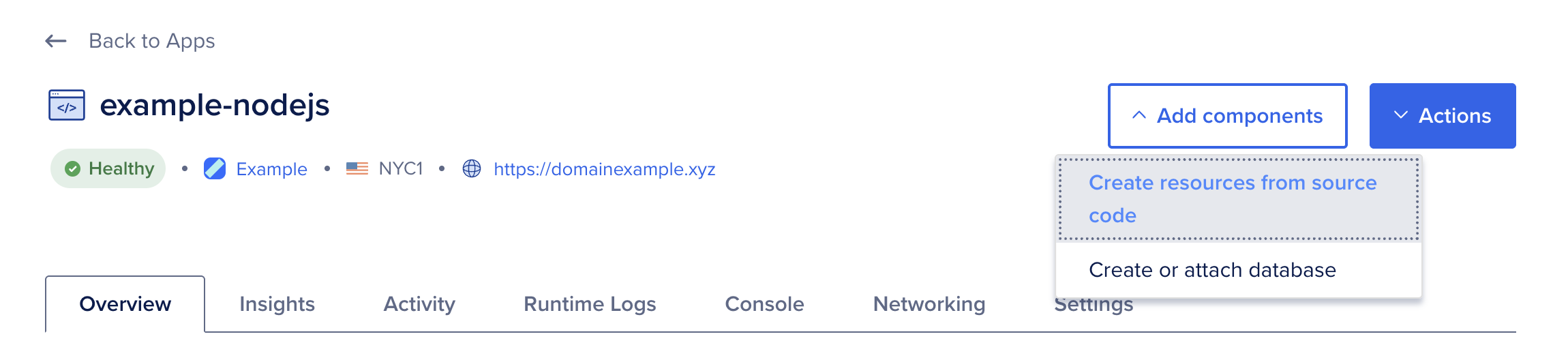
Resources screen

On the Choose a deployment source screen, select the code repository service your app resides on. If you have not previously created an app on App Platform, the repository service prompts you to provide DigitalOcean with read permissions to your account.
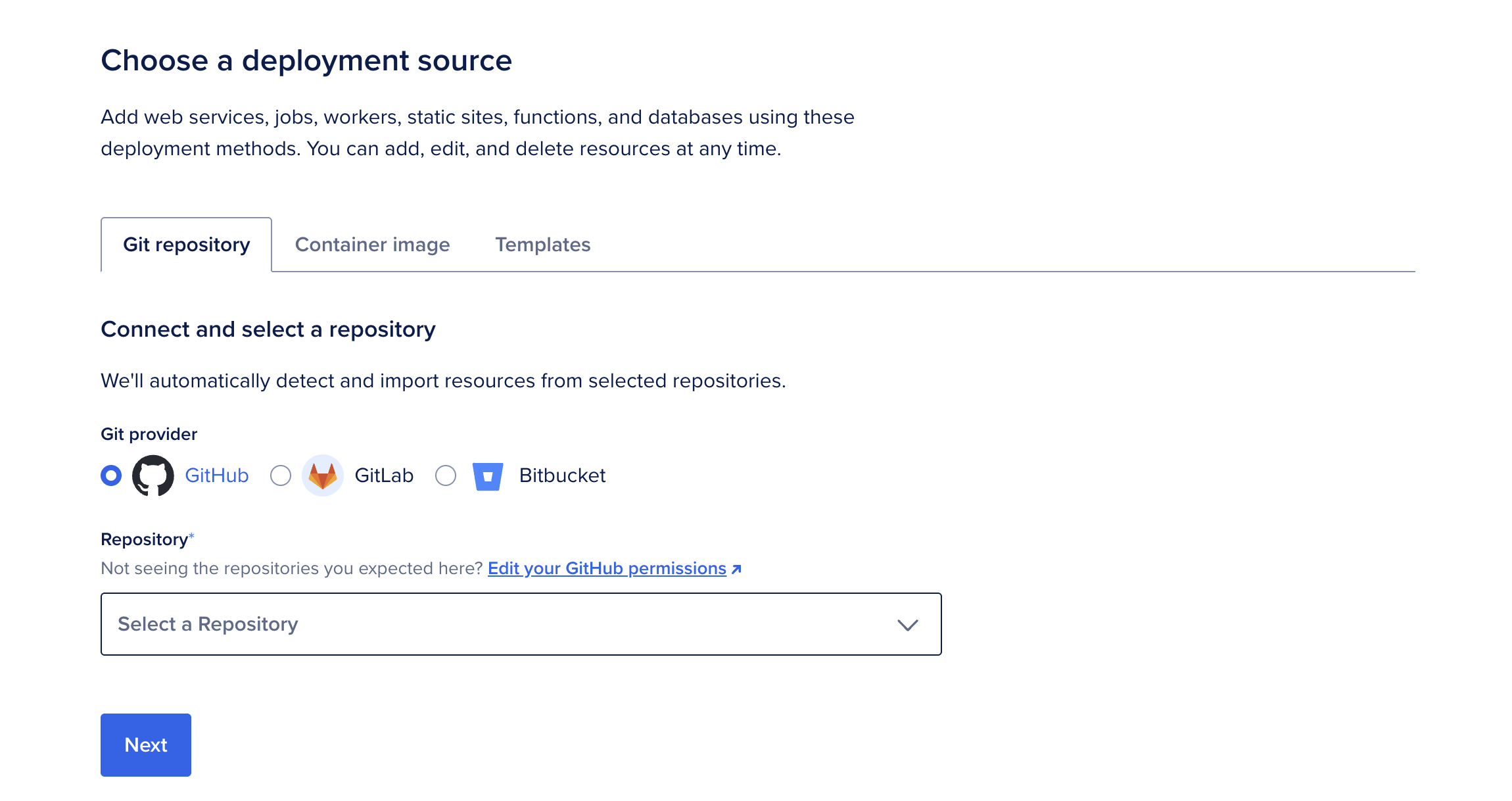
Build and deploy your app in the cloud with App Platform.

Select the app's repo from the Repository dropdown menu, then select the branch to deploy from in the Branch dropdown menu.

The Source Directory is the directory in the repo used to build the app. The default is the repo's root directory. If you're deploying from a monorepo or a container image registry, see Deploy from a Monorepo or How to Deploy from Container Images for more information on how to deploy apps using these options.

You can choose to opt out of auto-deploying code changes. Uncheck the Autodeploy box to disable App Platform from redeploying the app when it detects changes in the app's repo.

After you select the app's repo and branch, click Next. App Platform retrieves your app's code.

App Platform inspects the code and app resources and selects an appropriate runtime environment (such as Node or Ruby). If you need to override this, upload a Dockerfile to your branch and restart the app creation process.
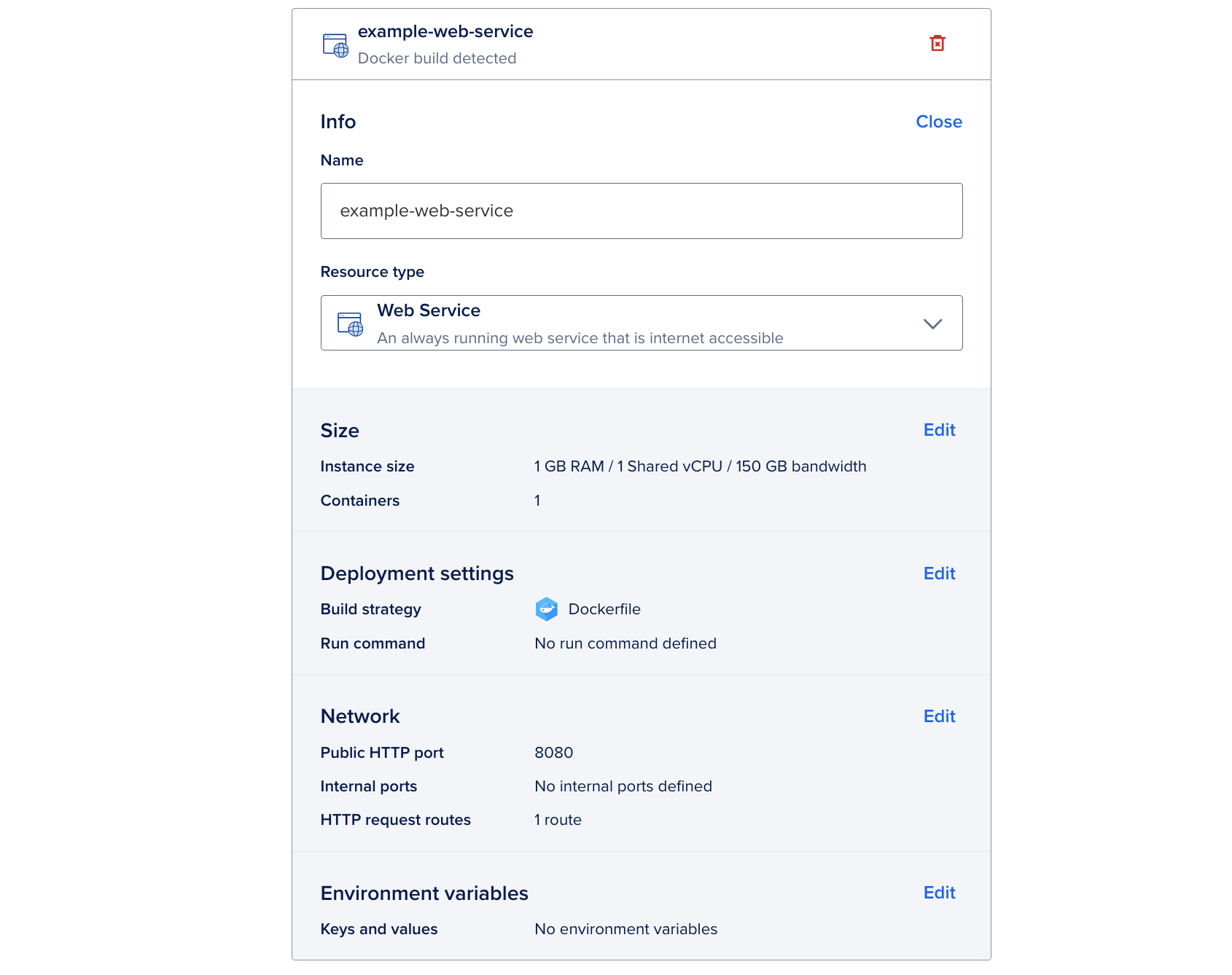
Create web service

To change to a different resource type, in the Info section, click Edit. In the Resource type dropdown menu, choose another option.

On the Resource settings page, you can also change the resource’s name, view the resource’s buildpacks, edit its build and run commands, edit the HTTP port, and more.

App Platform also displays the settings for the component, several of which may be auto-filled by App Platform's detection system. You can configure the following settings for your app:

  • Name: A unique name for the component.

  • Resource Type: The type of app to be deployed, either a web service, static site, or worker service. This field determines which additional configuration options are available for your app on this screen.

  • Instance Size: The amount of memory (RAM), number of CPUs, and bandwidth allocated to the component. You can select a size that uses either shared or dedicated CPUs. Shared CPUs share their processing power with other DigitalOcean users. Dedicated CPUs are dedicated solely to your app. We recommend dedicated CPUs for more resource-intensive applications that require consistent high performance and autoscaling.

  • Containers: You can also configure your app's scaling settings in this section. Depending on what instance size you select determines the scaling options available to the component. For more information about scaling, see How to Scale Apps in App Platform.

  • Build Strategy: Add a custom build command to run before the app is deployed. This is useful for compiling assets, installing dependencies, or running tests before deployment.

  • Run Command: For web and worker services only. You can specify custom run commands for the application to run after deployment. If no run commands are specified, the default run command for your app's language is used, such as npm start for a Node.js app. For Dockerfile-based builds, entering a run command overrides the Dockerfile's entrypoint.

  • Public HTTP Port: For web services only. The port that the app receives HTTP requests on. The default port is 8080.

  • Internal Ports: For web services only. The port that the app receives internal requests on.

  • HTTP Request Routes: For web services and static sites only. The URL path where the app can be accessed, such as your-app-v3cl4.ondigitalocean.app/api. If not specified, the app is accessible from the provided hostname's root.

  • Output Directory: For static sites only. An optional path to where the build assets are located, relative to the build context. If not set, App Platform automatically scans for these directory names: _static, dist, public, build.

App Platform uses cloud-native buildpacks to build your app and uses the buildpack's default build and run commands. Refer to the cloud-native buildpack reference for more information about specific buildpacks.

Environment

If your app requires environment variables, such as the app's URL or database connection strings, you can define them in this section. These can be runtime and build time environment variables. We also provide several app-specific dynamic environment variables that the app can reference. App-level variables can be accessed by all resources in your app.

In the App-level environment variables box, click the corresponding Edit link to specify app-level or component-level environment variables. Click the Encrypt checkbox to obscure the variable's values from all build, deployment, and application logs.

Once you configure the environment variables, click Add resources.

Note
The service must bind to and expose the HTTP port on the network interface 0.0.0.0 , rather than on the localhost (localhost) or loopback interface (127.0.0.1).

Full HTTP request path preservation for services is not available in the control panel. Instead, set the preserve_path_prefix annotation in the App Spec to true.

Edit a Service

On the Apps page of the DigitalOcean Control Panel, select your app, then click the Settings tab. Click the web service you want to edit.

You can use the configuration settings you see here to change the web service's scaling behavior, modify environment variables, edit commands, and more.

Destroy a Service

On the Apps page of the DigitalOcean Control Panel, select your app, then click the Settings tab. Click the web service you want to destroy.

You can destroy the web service by clicking the Destroy button at the bottom of the page and then entering its name to confirm.

Create an Internal Service

Internal services are accessible to other components in the app’s private network. They do not have ports or endpoints exposed to the public internet.

You can create an internal service by closing the ports on an existing service or by updating the app spec with the internal_ports field.

Create an Internal Service Using the Control Panel

To create an internal service, go to the Apps page, click your app, then click the Settings tab. On the Settings tab, select the service you want to make internal, scroll down to the Ports section, and then click Edit.

In the Ports section, clear the Public HTTP Port field to close the public port. Click Add internal ports for private networking, then enter the port you want to open in the Internal Port field. To add more internal ports, click Add internal port and repeat this step.

When finished, click Save to redeploy the app with the new internal ports.
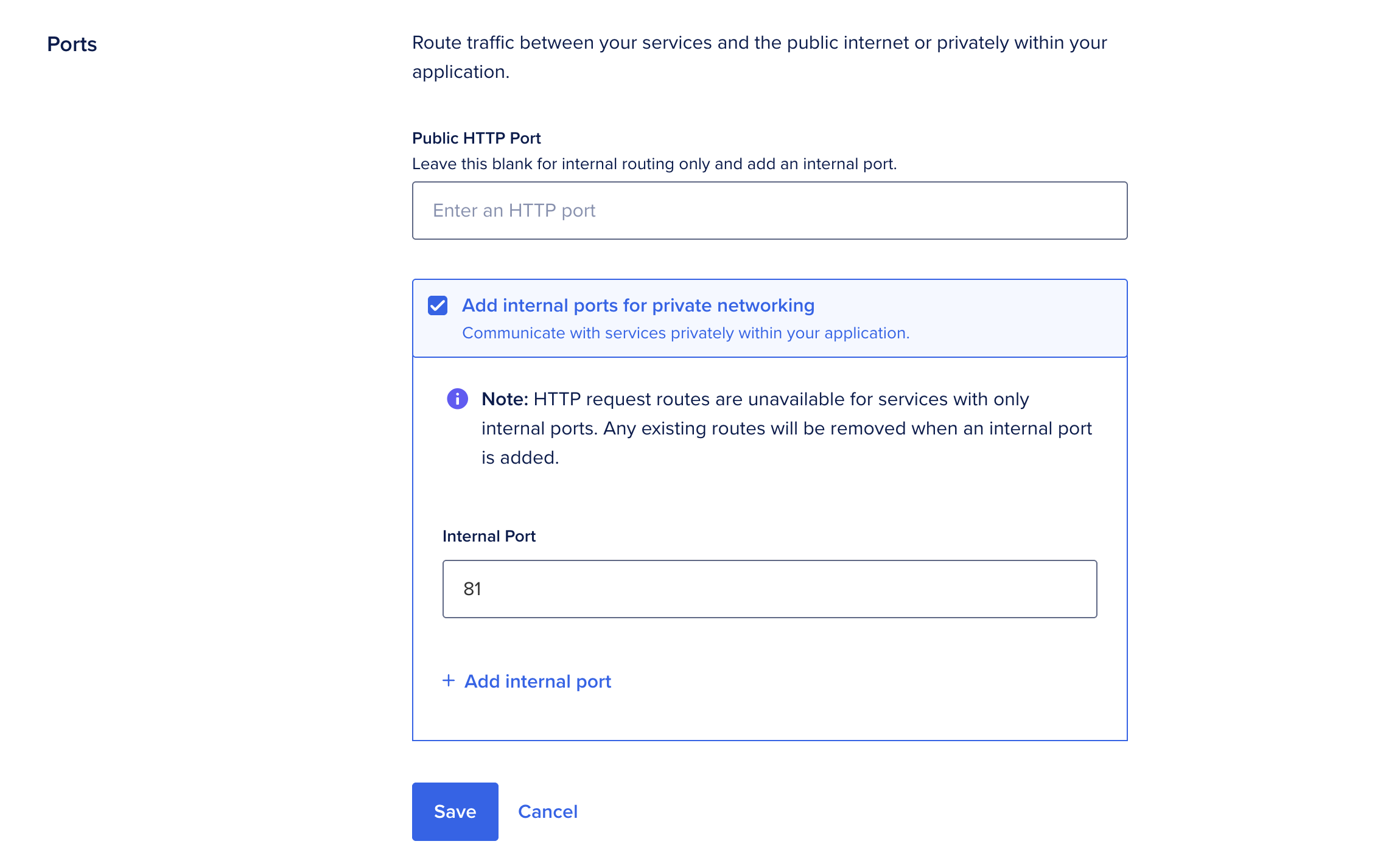
A screenshot of the Ports section of an app's settings. The internal port field is set to 81.

Create an Internal Service Using the App Spec

To create an internal service using the app spec, remove any existing http_port fields from the target service object and then add the internal_ports field to the service:

app.yaml
services:
- environment_slug: go
  github:
    branch: master
    deploy_on_push: true
    repo: digitalocean/sample-golang
  instance_count: 1
  instance_size_slug: apps-s-1vcpu-1gb
  internal_ports:
  - 8080
  name: internal-service
  run_command: bin/sample-golang

The example service above is an internal service because it has no HTTP port or route, so it is inaccessible from the public internet, but exposes port 8080 internally, so workers and other services can reach it.

Add a Function

To add Functions, adjust your app spec like so:

name: go-random
region: nyc
functions:
- name: go-api
  github:
    repo: digitalocean/sample-functions-golang-random
    branch: master
    deploy_on_push: true

This process requires you to authorize to GitHub and specify the region you want to create the Function in. You can also delete the region field to automatically create the Function in the datacenter closest to you.

We can't find any results for your search.

Try using different keywords or simplifying your search terms.